
Pro: Email Credentials
With Easy PV pro you can send emails to your customer within projects. By setting up your email credentials it means these emails will send from your domain, rather than from no-reply@easy-pv.co.uk.
To view or edit your email settings navigate to Pro account settings > Email

Here you can enter email credentials to allow emails to be sent from your own email address, how this is set up will depend on what email provider you are using.
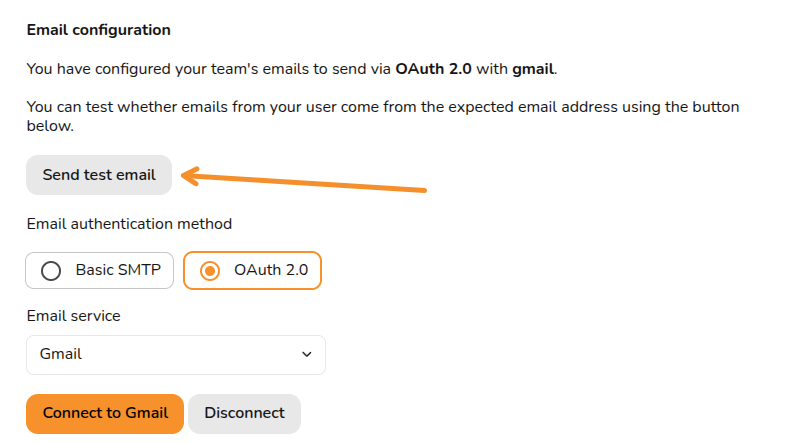
Email configuration
OAuth 2.0 (Gmail or Microsoft 365)
If Gmail or Microsoft 365 is your email provider, then simply select OAuth 2.0, select the relevant option and click Connect, this will direct you to your email where you can approve the connection.
SMTP
If you have a different email provider then you will need to set up using the SMTP option.
What is then required for each field depends on the provider and you will likely be able to find instructions online by searching for your provider and SMTP credentials. Below is some general guidance for each field:
- SMTP Username: These credentials are provided by your email service provider and are used to authenticate your email client. In most cases this is your full email address (e.g. user@provider.com)
- SMTP From Address (optional): This is the email address that recipients see as the sender of the email. In most cases this will be the same as the SMTP username
- SMTP Name (optional): This will appear next to the 'from address'
- SMTP Host: This will vary depending on provider. The format will be something like smtp.provider.com
- SMTP Password: This will usually be an App Password that you need to set up but in some cases it will be your email password
- SMTP Port (optional): By default this will be 587, but in some cases this will need to be changed
Once all required fields are filled in, click Save credentials.
Sending test email
To make sure your settings are working as intended, click Send test email and input an email address.
Still Need Help?
Contact Support: If you've got further questions, get in touch with our support team at help@easy-pv.co.uk (UK) or help@easy-pv.ie (IE). If you are having trouble setting up your credentials, please let us know what provider you are using, a screenshot of the email page with your inputs (do not share your password) and a screenshot of any errors that appear when you try to send emails.