If the selected inverter is not compatible with Solshare, you will not be able to add one. For guidance on designing a SolShare system, chat to your [Midsummer account handler](https://midsummerwholesale.co.uk/account). SolShare requires a minimum of 6x single-phase or 2x three-phase connections. The site must have a multi-service distribution board (MSDB) supplied by 1x incoming supply to enable SolShare system to work. **Read** **more about Solshare [here](https://midsummerwholesale.co.uk/buy/solshare)**.
## AC Isolators Specify an appropriate AC isolator for each inverter in your project, and check that it has an appropriate current rating. [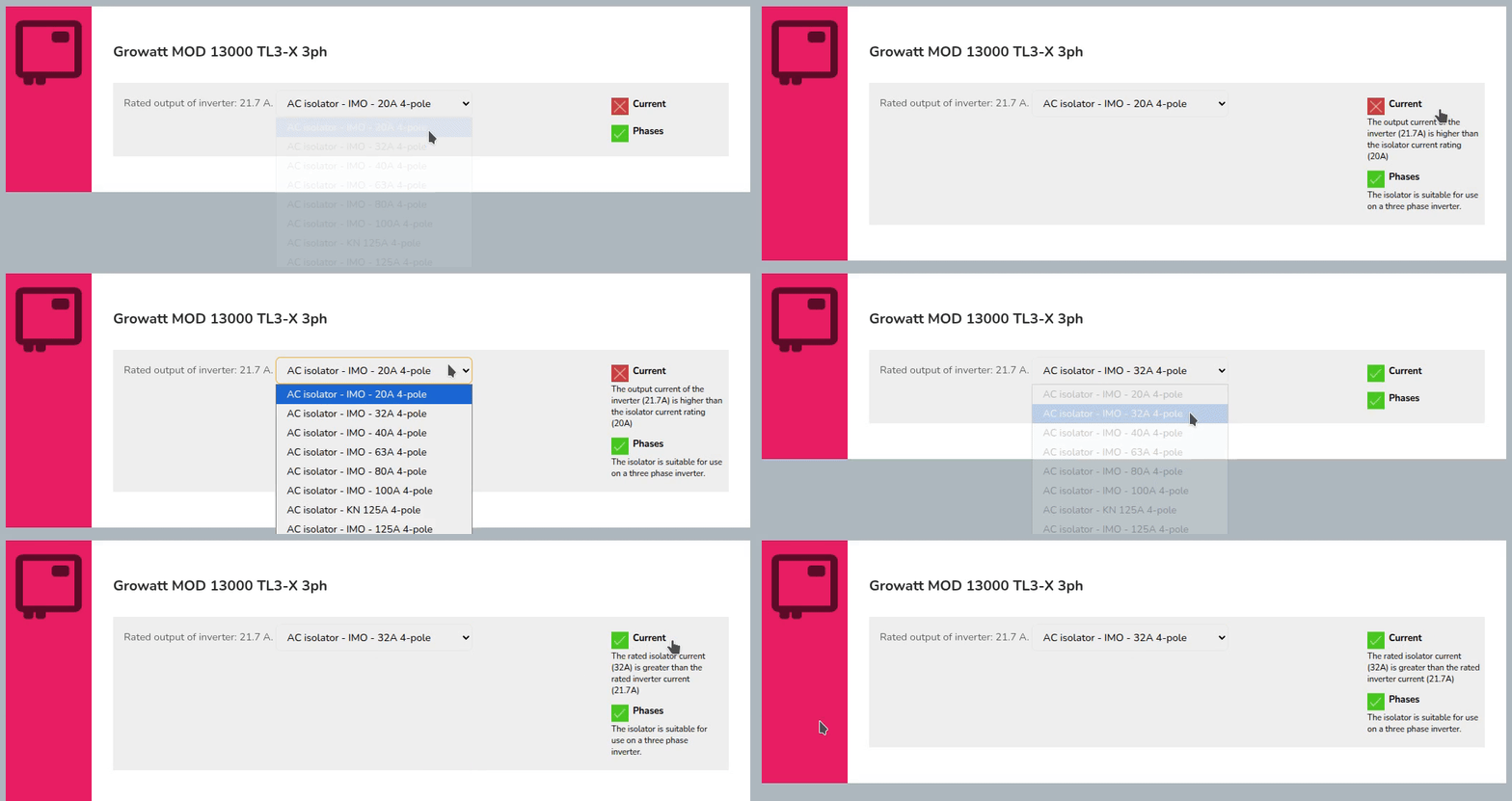](https://help.easy-pv.co.uk/uploads/images/gallery/2026-02/CIdBSvO0JTz8INMh-simplescreenrecorder-2026-02-11-15-26-56-ezgif-com-video-to-gif-converter.gif) Once selected, you can then click `Next: Meters`. ## Meter In this section, you'll be able to select from compatible generation meters. If no meters supplied by Midsummer are compatible, you will only have the option to select `No meter thanks`. You can also [add a custom meter](https://help.easy-pv.co.uk/books/creating-components/page/custom-accessories-and-other-components "Custom accessories and other components"). Then click `Next: Extras`. ## Extras Add monitoring, immersion controllers, battery storage and accessories to your project. Any extras required for components you've already added to the system will be selected automatically. Increase the count of any other extras you'd like included in the project. A **Smug Bug** will be added automatically in the 'Extras' if you have [Smug smart battery optimisation](https://help.easy-pv.co.uk/books/news-and-updates/page/smug-smart-battery-optimisation) toggled on by default, and if you have selected a compatible inverter. [](https://help.easy-pv.co.uk/uploads/images/gallery/2026-09/UC1GgCjIBrlhh5LX-image.png) To finish of the electrical task, click **`Next: overview`**. This will take you to the project overview where you can either click `Add to Cart` on the Midsummer basket or continue with the [Performance task](https://help.easy-pv.co.uk/books/performance-and-consumption/page/performance-task "Performance task"). --- ## Still Need Help? - **Related FAQs:** Check out our [Panels, Inverter and Electrical FAQs](https://help.easy-pv.co.uk/books/faqs/chapter/panels-inverter-and-electrical "Panels, inverter and electrical") for answers to common questions - **More guides**: Take a look at the [Performance task](https://help.easy-pv.co.uk/books/performance-and-consumption/page/performance-task "Performance task") and [Financial task](https://help.easy-pv.co.uk/books/financial-task/page/using-the-financial-task "Using the Financial task") guides - **Live training:** [Book onto a live demo session](https://cal.com/easy-pv/easy-pv-free-training) to see this feature in action **Contact Support:** If you've got further questions, get in touch with our support team at **help@easy-pv.co.uk** (UK) or **help@easy-pv.ie** (IE). *If you are experiencing a bug, to help us look into your issue faster, please include the email address of your account, the name of the project and screenshots of any unexpected behaviour.*