# Warm Homes loans in Easy PV

<div class="n6owBd awi2gc" data-complete="true" data-hveid="CAIIAAgGEAA" data-processed="true" data-sfc-cp="" data-sfc-root="c" id="bkmrk-the-warm-homes-loan-" jsaction="" jscontroller="TDBkbc#Ml18Xb" jsuid="a6x8gc_r"><div class="n6owBd awi2gc" data-complete="true" data-hveid="CAIIAAgGEAA" data-processed="true" data-sfc-cp="" data-sfc-root="c" jsaction="" jscontroller="TDBkbc#Ml18Xb" jsuid="a6x8gc_r">  
</div></div><span class="corp-pill pill-uk mceNonEditable" style="user-select: none;"><span class="corp-flag material-symbols-rounded">​</span>easy-pv.co.uk</span>

The [Warm Homes Loan Scheme](https://www.gov.uk/government/news/warm-homes-loan-scheme-factsheet) (WHLS) is a UK government-backed initiative designed to help homeowners and private landlords afford low-carbon home energy upgrades by providing zero or low-interest loans.

Easy PV supports the WHLS. You can mark a finance payment option as a warm homes loan to add a page to your proposal, explaining the scheme.

## How the loan works

The government gives participating lenders a grant for each loan, which the lender passes on to the homeowner as a reduced interest rate. The homeowner applies directly to a participating lender rather than the government. The lender evaluates the application, makes the final decision on whether to approve the finance, and sets the specific repayment terms, meaning the loan contract is established with the lender, not the government.

The homeowner can borrow up to £30,000 for a solar panel and battery storage installation, or up to £15,000 for solar panels or battery storage on their own. Limits include installation, scaffolding and grid connection. Roofing repairs, structural work and insulation are not covered.

The scheme is open to homeowners and private landlords, anywhere in the UK with no income limit for applicants. However, acceptance is subject to individual affordability checks, and each participating lender reserves the right to set its own additional conditions. A Warm Homes loan can't pay for work that another public grant or loan is also paying for. To qualify for the loan, all installation work must be carried out by an MCS-certified installer<span class="rQesXe MPyX">.</span>

After the installation work is done, it may be chosen at random for an audit by the government or MCS.

<div class="n6owBd awi2gc" data-complete="true" data-hveid="CAIIAAgGEAA" data-processed="true" data-sfc-cp="" data-sfc-root="c" id="bkmrk--7" jsaction="" jscontroller="TDBkbc#Ml18Xb" jsuid="a6x8gc_r"></div><div class="n6owBd awi2gc" data-complete="true" data-hveid="CAIIAAgGEAA" data-processed="true" data-sfc-cp="" data-sfc-root="c" id="bkmrk--8" jsaction="" jscontroller="TDBkbc#Ml18Xb" jsuid="a6x8gc_r"></div>
<p class="callout info">To find out more about the scheme, visit [https://www.gov.uk/warm-homes-loan-scheme](https://www.gov.uk/warm-homes-loan-scheme)</p>

## How to configure in Easy PV

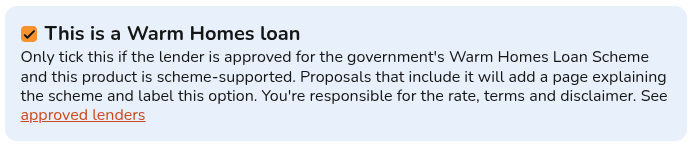
In your financial settings, create a new finance [payment option](https://help.easy-pv.co.uk/books/financial-task-customer-proposal/page/payment-options) and tick the box indicating<span class="rQesXe MPyX"> that the lender is participating in the Warm Homes Loan Scheme. </span>

[![image.png](https://help.easy-pv.co.uk/uploads/images/gallery/2026-11/scaled-1680-/dQOzADXsQDH12TVx-image.png)](https://help.easy-pv.co.uk/uploads/images/gallery/2026-11/dQOzADXsQDH12TVx-image.png)

Enable the finance option on your project in the [Financial task](https://help.easy-pv.co.uk/books/financial-task-customer-proposal/page/using-the-financial-task) by ticking it in the list of payment options. Once enabled on a project, the "Warm Homes Loan" tag will automatically display next to the payment option on the Customer Proposal. Additionally, the proposal will feature a dedicated informational page with details on the Warm Homes Loan Scheme.

---

## Still Need Help? / Want to know more?


- **Related FAQs:** Check out our [Financial task FAQs](https://help.easy-pv.co.uk/books/faqs/chapter/financial-task) for answers to common questions
- **More guides**: Take a look at [Financial task](https://help.easy-pv.co.uk/books/financial-task-customer-proposal/page/using-the-financial-task) and [Payment options](https://help.easy-pv.co.uk/books/financial-task-customer-proposal/page/payment-options)
- **Live training:** [Book onto a live demo session](https://cal.com/easy-pv/easy-pv-free-training) to see this feature in action

**Contact Support:** If you've got further questions, get in touch with our support team at **help@easy-pv.co.uk** (UK). *If you are experiencing a bug, to help us look into your issue faster, please include the email address of your account, the name of the project and screenshots of any unexpected behaviour.*