Performance task preferences
The Performance task can be streamlined by configuring your settings in My account > Preferences > Performance or Pro Account Settings > Performance. Here you have the option to configure whether you want panel allocation and the generation of sunpath diagrams and shading factors to be automated.
Panel allocation
Choose between:
- Automatically allocate panels: use auto-stringing to automatically make a string plan without any input needed from you.
- Suggest allocation: use auto-stringing to make a string plan which it will suggest for you to accept or edit manually.
- Manually allocate panels: manually construct your string plan, with the option to use auto-stringing when you do so.
Sunpaths
With 3D and Magic design mode, Easy PV can automatically calculate any shading losses.
Here you can choose whether you want Easy PV to automatically calculate shading based on the terrain and 3D buildings or whether you want this to be excluded so you can set the shading manually.
Self-consumption and performance
Choose which method you'd like to use to calculate the total annual generation of the system.
Warning: Changing the performance mode used with affect all projects.
Choose from:
- easy-pv.co.ukMCS: This is based on the method detailed in Appendix B of MIS 3002: The Solar PV Standard (Installation) and will only work for UK postcodes.
- NREL: This method is based on NREL's PVWatts calculator, this is an international method that works for any location.
- PVGIS: This is another international option that is based on PVGIS data so will work for any location.
If selecting the MCS method, you can also choose whether you want to:
- Set default values for MCS self consumption: this will let you set default values which will be used by default for each of the inputs required for the MCS consumption calculations.
- Manually enter MCS self consumption: if you select this option you will need to set the inputs required for the MCS calculations on every project.
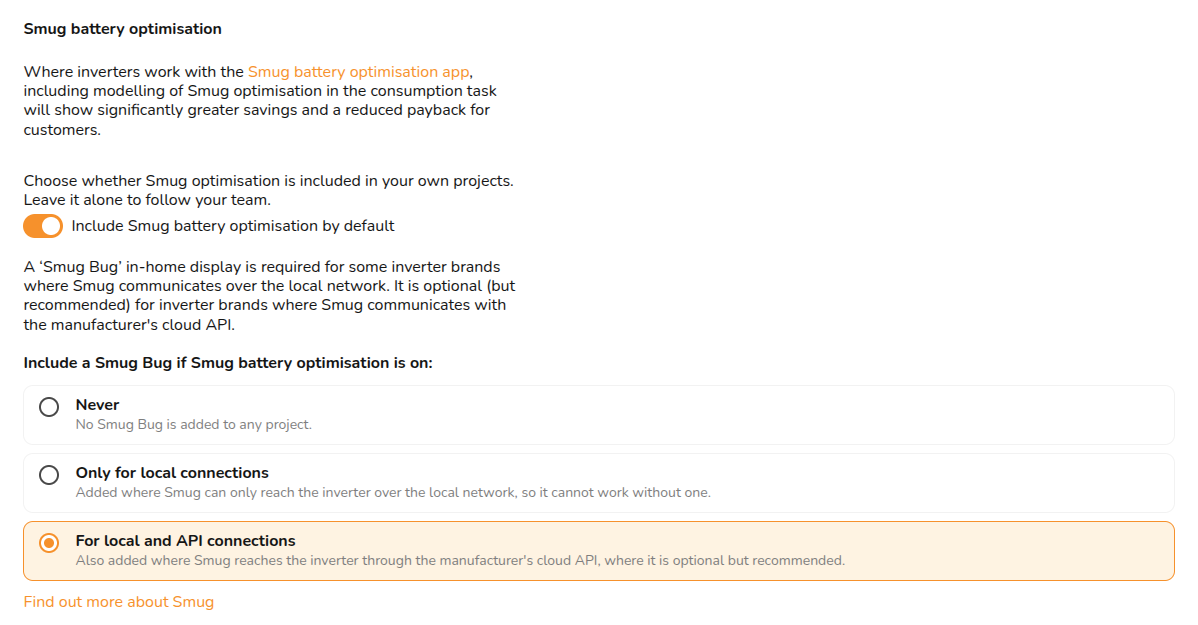
Smug battery optimisation
-
Never - Smug Bugs will not be added by default to any project.
-
Only for local connections - Smug Bugs are included in projects where Smug can only reach the inverter over the local network, not through cloud API.
-
For local and API connections - Smug Bugs are added by default when the selected inverter can be reached by Smug through the manufacturer’s cloud API, where Smug is optional but recommended.
Still Need Help?
Contact Support: If you've got further questions, get in touch with our support team at help@easy-pv.co.uk (UK) or help@easy-pv.ie (IE). If you are experiencing a bug, to help us look into your issue faster, please include the email address of your account, the name of the project and screenshots of any unexpected behaviour.