# General
# Can I pay Easy PV to design a project for me?
No, this is not a service we offer at Easy PV. If you’re struggling to use the software, you can always come to one or more of our [free](https://cal.com/easy-pv) training sessions!
If you're **uncertain on what kit to use**, have a chat with your [Midsummer](https://midsummerwholesale.co.uk/) account handler and they will be able to assist. You can sign up to a Midsummer account [here](https://midsummerwholesale.co.uk/register).
If you're **having trouble with a 3D design**, we recommend booking onto our [3D training session ](https://cal.com/easy-pv/introduction-to-3d-design-in-easy-pv)where we can run through any complex designs with you.
# How do I link my Midsummer Account to pull over my trade prices?
To link your Midsummer wholesale account, please follow this [guide](https://help.easy-pv.co.uk/books/getting-started-f2k/page/connecting-to-midsummer).
If you do not yet have a Midsummer wholesale account, you can sign up [here](https://midsummerwholesale.co.uk/register).
# Can I do a retrofit project in Easy PV?
Yes, to create a quote for a retrofit project:
1. Recreate the existing system in Easy PV with the new additions.
2. Remove all existing components or set their price to £0 in the [Financial task](https://help.easy-pv.co.uk/books/financial-task-customer-proposal/page/using-the-financial-task "Financial Task").
If you need to create custom components to recreate the existing system, you can use our detailed [component guide](https://help.easy-pv.co.uk/books/creating-components/chapter/create-and-manage-your-own-components "Create and manage your own components").
# Can I do commercial or industrial designs in Easy PV?
Yes, you can use Easy PV for both commercial and domestic projects. Some features that will help with the accuracy and speed of commercial designs include:
- Automatic panel stringing
- Choice of a range of commercial consumption profiles or upload your customer's meter data directly.
- Support for setting export limits and viewing inverter and export clipping in charts.
More details on these features can be found in our [Performance](https://help.easy-pv.co.uk/books/performance-and-consumption/page/performance-task "Performance task") and [Consumption](https://help.easy-pv.co.uk/books/performance-and-consumption/page/getting-started-with-the-consumption-task "Consumption task") task guides.
# Can I do a battery-only project?
At the moment, this is not yet a supported feature. However, if you would like to quote a battery only project in the format then you can create a project that has only the quote by following these steps:
1. Create a quick roof project
2. Skip through the roof task (no need to change anything)
3. Open the financial task and fill in the quote
4. Generate the proposal
This proposal will contain only the quote.
# How do I change my email address?
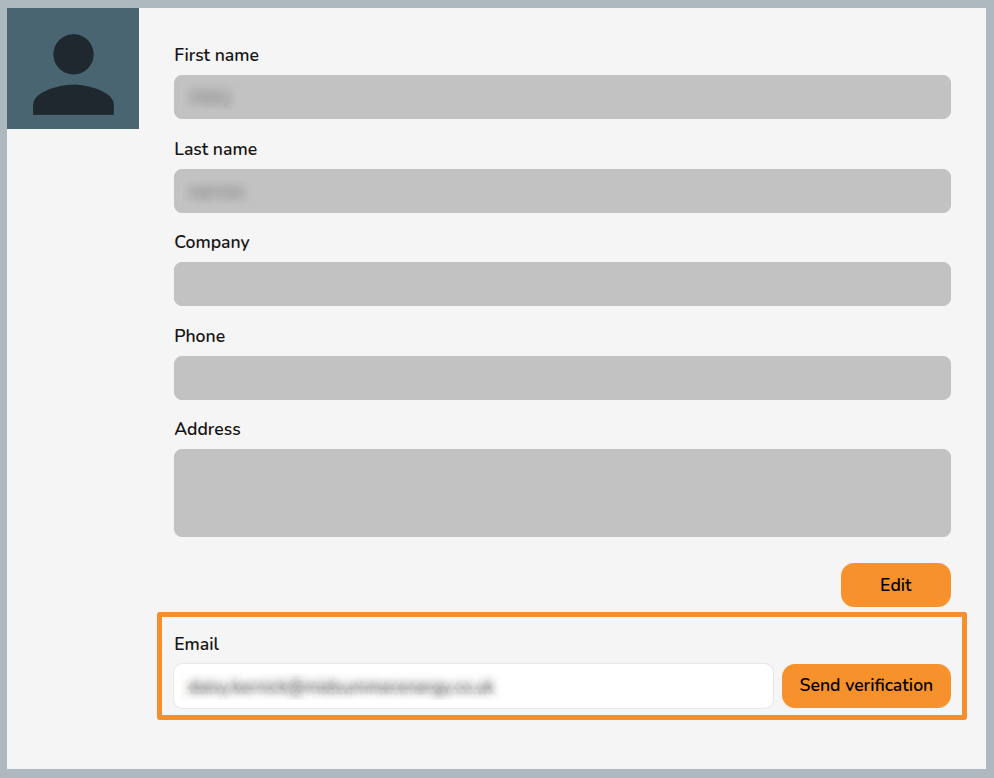
1. Navigate to `My Account` in the top right and `My details`.
2. Under **Email** type in your new email address.
[](https://help.easy-pv.co.uk/uploads/images/gallery/2026-07/BoIMoKKJoF9Tw9p4-image.png)
3. Click **`Sent verification`**.
4. If there is not already an account with that email address, the new email address will receive a link to confirm the change. Click the link to confirm the change.
**Note**: the link will expire after 15 minutes. If you do not click in within that time you will need to generate another verification link.
# Why is my date in the wrong format?
This is set by your device or browser settings, which may be set to English (US), giving the American date format (MM/DD/YYYY). Change this first in your device or browser settings, then reboot your browser (easiest way is to turn your computer off and on again).
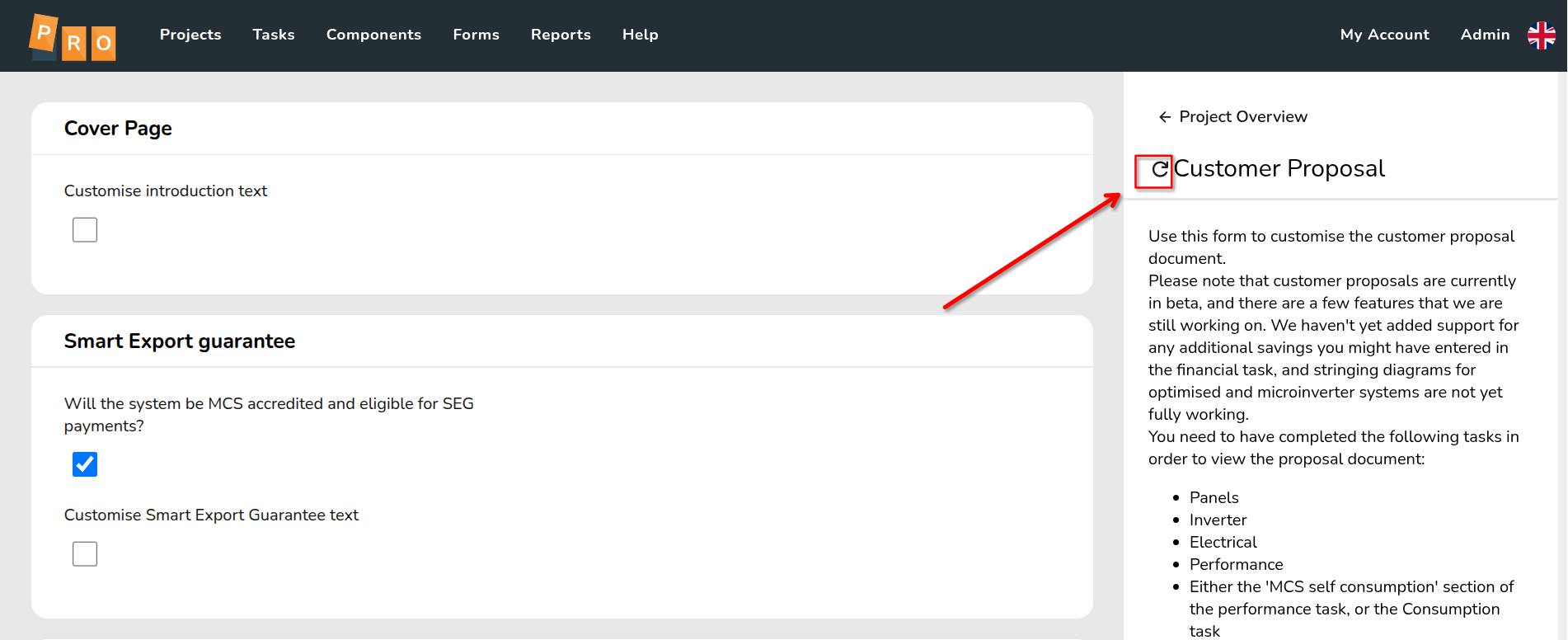
Once you have the correct date format, subsequently created projects will display it correctly. You can update existing projects by refreshing the Customer Proposal before generating it:
[](https://help.easy-pv.co.uk/uploads/images/gallery/2026-07/HCUSetbwzbWNUgSR-image.png)
# What's happened to the international site?
As of **September 2025**, the Easy PV International site (easy-pv.com) will not be available. We’re working on a full upgrade of the International site, and we expect it to be back online within a few months. We’ll notify users as soon as it’s live.
##### Why is the site not available?
Over the past few years, our UK and Irish versions of Easy PV have seen major upgrades – introducing features like Pro accounts, faster performance, and tools such as automated roof scanning and Speedy PV lead generation. These improvements have made them significantly more powerful and reliable.
Unfortunately, the International site has fallen behind and is built on older infrastructure that’s increasingly difficult to maintain. Rather than patching it, we’ve decided to rebuild it properly so it can offer the same high-quality experience as our other platforms.
As a result of this, the Easy PV International site (easy-pv.com) will no longer be available from September 2025. We’re working on a full upgrade of the International site, and we expect it to be back online within a few months. We’ll notify users as soon as it’s live.
##### Can I still use Easy PV in the meantime?
You’re welcome to create a free account and use either the [UK](http://easy-pv.co.uk/) or [Irish](http://easy-pv.ie/) sites. Both function reasonably well for international users, although some features may not work (like roof scanning) and some of the calculated generation and consumption data may not be accurate for use outside the UK and Ireland.
##### I have important project data stored in my Easy PV account, can you help me access this?
Please reach out to our support team and we'll try and help get you access to relevant data and/or documents from your projects.
##### Need more help?
If you have any other questions or need assistance, feel free to contact us at .
# How do I do a hard refresh of my browser?
Sometimes your browser may store old versions of the Easy PV code and this can cause issues. A **hard refresh** clears your browser cache for a specific page, which forces it to load the most recent version of that page. This could include new scripts, styles or features. Here's how you can clear your cache through a hard refresh on any browser:
#### Google Chrome
- Load any page on the Easy PV site and make sure you are logged in.
- Windows users: hold down **`Ctrl`** and then press `F5` on your keyboard (alternatively hold down **`Ctrl` + `Shift`** and press `R` on your keyboard).
- Mac users: hold down `Cmd` and `Shift` and then press `R` on your keyboard.
#### Firefox
- Load any page on the Easy PV site and make sure you are logged in.
- For Windows users: hold down **`Ctrl`** and then press `F5` on your keyboard.
- Mac users: hold down `Cmd` and `Shift` and then press `R` on your keyboard.
#### Safari (Mac)
- Load any page on the Easy PV site and make sure you are logged in
- Go to Safari > Empty Cache, or hit **`Opt`** + `Cmd` + `E`
- To refresh, click the refresh button on the address bar or press `Cmd` + `R`
#### Microsoft Edge/Internet Explorer (Windows)
- Load any page on the Easy PV site and make sure you are logged in
- Hold down **`Ctrl`** and then press `F5` on your keyboard (alternatively hold down **`Ctrl` + `Shift`** and press `R` on your keyboard).
Important: Clicking the "Refresh" icon on your browser address bar is **not** a hard refresh.