# Introduction to Outline design mode

<div class="n6owBd awi2gc" data-complete="true" data-copy-service-computed-style="font-family: "Google Sans", sans-serif; font-size: 16px; font-weight: 400; margin: 12px 0px 16px; text-decoration: none; border-bottom: 0px rgb(22, 23, 26);" data-hveid="CAAICBAA" data-processed="true" data-sfc-cp="" data-sfc-root="ep" id="bkmrk-with-easy-pv%27s-outli" jsaction="" jscontroller="TDBkbc#Ml18Xb" jsuid="UxKD0c_y">With Easy PV's **Outline** design mode, you can model a roof directly over satellite imagery, using automated detection tools to speed up your design process. Simply verify the automatically detected roof shape and details, or hand-draw your roof and add any obstructions.</div><div class="yhAwj" data-complete="true" data-copy-service-computed-style="font-family: "Google Sans", sans-serif; font-size: 14px; font-weight: 400; margin: 0px; text-decoration: none; border-bottom: 0px rgb(22, 23, 26);" data-processed="true" data-sfc-cp="" data-sfc-inited="2" data-sfc-root="ep" id="bkmrk-" jsaction="rcuQ6b:&UxKD0c_15|npT2md" jscontroller="UTzWVc#U8DOt" jsuid="UxKD0c_15"></div>---

#### **Creating an Outline design**

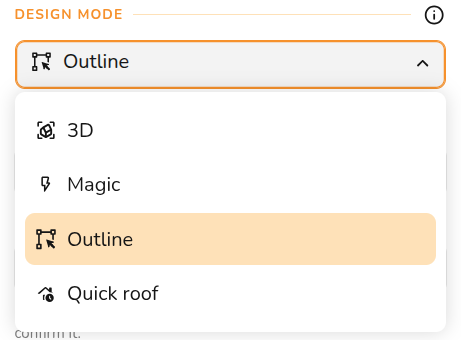
<div class="n6owBd awi2gc" data-complete="true" data-copy-service-computed-style="font-family: "Google Sans", sans-serif; font-size: 16px; font-weight: 400; margin: 12px 0px 16px; text-decoration: none; border-bottom: 0px rgb(22, 23, 26);" data-hveid="CAAIChAA" data-processed="true" data-sfc-cp="" data-sfc-root="ep" id="bkmrk-outline-is-selected-" jsaction="" jscontroller="TDBkbc#Ml18Xb" jsuid="UxKD0c_17">**Outline** is selected when you first create a project, input project details and under **Design Mode** select **Outline**. Then click **Create** in the bottom right.</div><div class="n6owBd awi2gc" data-complete="true" data-copy-service-computed-style="font-family: "Google Sans", sans-serif; font-size: 16px; font-weight: 400; margin: 12px 0px 16px; text-decoration: none; border-bottom: 0px rgb(22, 23, 26);" data-hveid="CAAIChAA" data-processed="true" data-sfc-cp="" data-sfc-root="ep" id="bkmrk--2" jsaction="" jscontroller="TDBkbc#Ml18Xb" jsuid="UxKD0c_17"></div>[![image.png](https://help.easy-pv.co.uk/uploads/images/gallery/2026-09/scaled-1680-/LF771tZSRXXKcnbM-image.png)](https://help.easy-pv.co.uk/uploads/images/gallery/2026-09/LF771tZSRXXKcnbM-image.png)

<div class="n6owBd awi2gc" data-complete="true" data-copy-service-computed-style="font-family: "Google Sans", sans-serif; font-size: 16px; font-weight: 400; margin: 12px 0px 16px; text-decoration: none; border-bottom: 0px rgb(22, 23, 26);" data-hveid="CAAICxAA" data-processed="true" data-sfc-cp="" data-sfc-root="ep" id="bkmrk-this-will-then-take-" jsaction="" jscontroller="TDBkbc#Ml18Xb" jsuid="UxKD0c_1g">This will then take you to the **Outline** task tab where you can model the roof.</div>---

<div class="yhAwj" data-complete="true" data-copy-service-computed-style="font-family: "Google Sans", sans-serif; font-size: 14px; font-weight: 400; margin: 0px; text-decoration: none; border-bottom: 0px rgb(22, 23, 26);" data-processed="true" data-sfc-cp="" data-sfc-inited="2" data-sfc-root="ep" id="bkmrk--5" jsaction="rcuQ6b:&UxKD0c_1n|npT2md" jscontroller="UTzWVc#U8DOt" jsuid="UxKD0c_1n"></div>#### **Outline task overview**

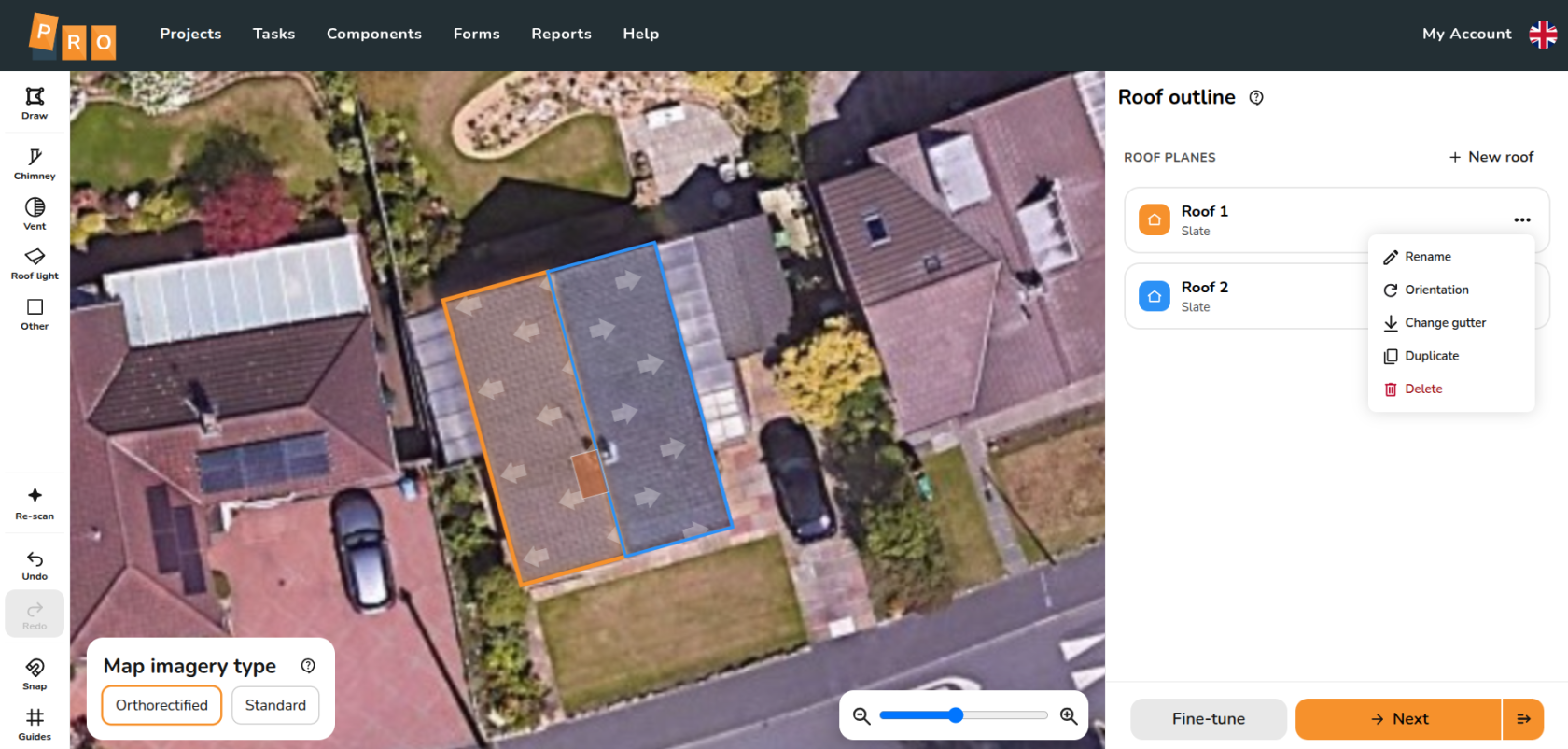
<div class="n6owBd awi2gc" data-complete="true" data-copy-service-computed-style="font-family: "Google Sans", sans-serif; font-size: 16px; font-weight: 400; margin: 12px 0px 16px; text-decoration: none; border-bottom: 0px rgb(22, 23, 26);" data-hveid="CAAIDRAA" data-processed="true" data-sfc-cp="" data-sfc-root="ep" id="bkmrk-in-the-outline-task-" jsaction="" jscontroller="TDBkbc#Ml18Xb" jsuid="UxKD0c_1p">In the Outline task you can create and edit your 2D roof model over satellite imagery.</div><div class="n6owBd awi2gc" data-complete="true" data-copy-service-computed-style="font-family: "Google Sans", sans-serif; font-size: 16px; font-weight: 400; margin: 12px 0px 16px; text-decoration: none; border-bottom: 0px rgb(22, 23, 26);" data-hveid="CAAIDRAA" data-processed="true" data-sfc-cp="" data-sfc-root="ep" id="bkmrk--6" jsaction="" jscontroller="TDBkbc#Ml18Xb" jsuid="UxKD0c_1p"></div>[![image.png](https://help.easy-pv.co.uk/uploads/images/gallery/2026-09/scaled-1680-/37X81wVb9La1K7sP-image.png)](https://help.easy-pv.co.uk/uploads/images/gallery/2026-09/37X81wVb9La1K7sP-image.png)

<div class="n6owBd awi2gc" data-complete="true" data-copy-service-computed-style="font-family: "Google Sans", sans-serif; font-size: 16px; font-weight: 400; margin: 12px 0px 16px; text-decoration: none; border-bottom: 0px rgb(22, 23, 26);" data-hveid="CAAIDRAA" data-processed="true" data-sfc-cp="" data-sfc-root="ep" id="bkmrk--8" jsaction="" jscontroller="TDBkbc#Ml18Xb" jsuid="UxKD0c_1p"></div><div class="n6owBd awi2gc" data-complete="true" data-copy-service-computed-style="font-family: "Google Sans", sans-serif; font-size: 16px; font-weight: 400; margin: 12px 0px 16px; text-decoration: none; border-bottom: 0px rgb(22, 23, 26);" data-hveid="CAAIDRAA" data-processed="true" data-sfc-cp="" data-sfc-root="ep" id="bkmrk--9" jsaction="" jscontroller="TDBkbc#Ml18Xb" jsuid="UxKD0c_1p"></div><div class="n6owBd awi2gc" data-complete="true" data-copy-service-computed-style="font-family: "Google Sans", sans-serif; font-size: 16px; font-weight: 400; margin: 12px 0px 16px; text-decoration: none; border-bottom: 0px rgb(22, 23, 26);" data-hveid="CAAIDRAA" data-processed="true" data-sfc-cp="" data-sfc-root="ep" id="bkmrk--10" jsaction="" jscontroller="TDBkbc#Ml18Xb" jsuid="UxKD0c_1p"></div><div class="n6owBd awi2gc" data-complete="true" data-copy-service-computed-style="font-family: "Google Sans", sans-serif; font-size: 16px; font-weight: 400; margin: 12px 0px 16px; text-decoration: none; border-bottom: 0px rgb(22, 23, 26);" data-hveid="CAAIDRAA" data-processed="true" data-sfc-cp="" data-sfc-root="ep" id="bkmrk--11" jsaction="" jscontroller="TDBkbc#Ml18Xb" jsuid="UxKD0c_1p"></div><div class="n6owBd awi2gc" data-complete="true" data-copy-service-computed-style="font-family: "Google Sans", sans-serif; font-size: 16px; font-weight: 400; margin: 12px 0px 16px; text-decoration: none; border-bottom: 0px rgb(22, 23, 26);" data-hveid="CAAIDhAA" data-processed="true" data-sfc-cp="" data-sfc-root="ep" id="bkmrk-in-the-sidebar%2C-clic" jsaction="" jscontroller="TDBkbc#Ml18Xb" jsuid="UxKD0c_1v">In the sidebar, clicking the **⋯ three dots** on a roof will show the following options:</div>- <span class="iNqyIf" data-complete="true" data-copy-service-computed-style="font-family: "Google Sans", sans-serif; font-size: 16px; font-weight: 400; margin: 0px; text-decoration: none; border-bottom: 0px rgb(22, 23, 26);" data-sfc-cp="" data-sfc-root="ep">**[![image.png](https://help.easy-pv.co.uk/uploads/images/gallery/2026-09/scaled-1680-/q3p1bhhjPvNtdhw2-image.png)](https://help.easy-pv.co.uk/uploads/images/gallery/2026-09/q3p1bhhjPvNtdhw2-image.png)Rename**: Change the roof name. You can also double-click the card to edit the name in place.</span>
- **<span class="iNqyIf" data-complete="true" data-copy-service-computed-style="font-family: "Google Sans", sans-serif; font-size: 16px; font-weight: 400; margin: 0px; text-decoration: none; border-bottom: 0px rgb(22, 23, 26);" data-sfc-cp="" data-sfc-root="ep">[![image.png](https://help.easy-pv.co.uk/uploads/images/gallery/2025-08/scaled-1680-/Wput4MsdkFFLpIse-image.png)](https://help.easy-pv.co.uk/uploads/images/gallery/2025-08/Wput4MsdkFFLpIse-image.png)Orientation: </span>**<span class="iNqyIf" data-complete="true" data-copy-service-computed-style="font-family: "Google Sans", sans-serif; font-size: 16px; font-weight: 400; margin: 0px; text-decoration: none; border-bottom: 0px rgb(22, 23, 26);" data-sfc-cp="" data-sfc-root="ep">Adjust by typing an exact bearing in degrees or using the quarter-turn buttons.</span>
- **[![Download.jpg](https://help.easy-pv.co.uk/uploads/images/gallery/2025-11/scaled-1680-/wmZ0JHkpTpkgZIgN-download.jpg)](https://help.easy-pv.co.uk/uploads/images/gallery/2025-11/wmZ0JHkpTpkgZIgN-download.jpg)Change Gutter:** Choose which side the gutter is on
- **[![image.png](https://help.easy-pv.co.uk/uploads/images/gallery/2025-09/scaled-1680-/jMO6FxliPQuscMfZ-image.png)](https://help.easy-pv.co.uk/uploads/images/gallery/2025-09/jMO6FxliPQuscMfZ-image.png)Duplicate:** Duplicate the roof

- <span class="iNqyIf" data-complete="true" data-copy-service-computed-style="font-family: "Google Sans", sans-serif; font-size: 16px; font-weight: 400; margin: 0px; text-decoration: none; border-bottom: 0px rgb(22, 23, 26);" data-sfc-cp="" data-sfc-root="ep">****[![image.png](https://help.easy-pv.co.uk/uploads/images/gallery/2025-09/scaled-1680-/UcWzpF4HY8xhSg91-image.png)](https://help.easy-pv.co.uk/uploads/images/gallery/2025-09/UcWzpF4HY8xhSg91-image.png)**Delete**: Delete the roof from the project. </span><span class="iNqyIf" data-complete="true" data-copy-service-computed-style="font-family: "Google Sans", sans-serif; font-size: 16px; font-weight: 400; margin: 0px; text-decoration: none; border-bottom: 0px rgb(22, 23, 26);" data-sfc-cp="" data-sfc-root="ep">Hold `Shift` or `Ctrl` to select multiple roof cards at once and delete them together using the floating map button.</span>

---

#### **Creating roof model**

#### Automatic roof detection

<div class="yhAwj" data-complete="true" data-copy-service-computed-style="font-family: "Google Sans", sans-serif; font-size: 14px; font-weight: 400; margin: 0px; text-decoration: none; border-bottom: 0px rgb(22, 23, 26);" data-processed="true" data-sfc-cp="" data-sfc-inited="2" data-sfc-root="ep" id="bkmrk--13" jsaction="rcuQ6b:&UxKD0c_2l|npT2md" jscontroller="UTzWVc#U8DOt" jsuid="UxKD0c_2l"></div><div class="n6owBd awi2gc" data-complete="true" data-copy-service-computed-style="font-family: "Google Sans", sans-serif; font-size: 16px; font-weight: 400; margin: 12px 0px 16px; text-decoration: none; border-bottom: 0px rgb(22, 23, 26);" data-hveid="CAAIEhAA" data-processed="true" data-sfc-cp="" data-sfc-root="ep" id="bkmrk-when-you-first-open-" jsaction="" jscontroller="TDBkbc#Ml18Xb" jsuid="UxKD0c_2s">When you first open an Outline project, the system will automatically run a roof-scan and draw any detected roofs and gutters for you.</div>[![image.png](https://help.easy-pv.co.uk/uploads/images/gallery/2026-09/scaled-1680-/DH1F0pjPtKteLX3B-image.png)](https://help.easy-pv.co.uk/uploads/images/gallery/2026-09/DH1F0pjPtKteLX3B-image.png)

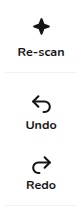
- <span class="iNqyIf" data-complete="true" data-copy-service-computed-style="font-family: "Google Sans", sans-serif; font-size: 16px; font-weight: 400; margin: 0px; text-decoration: none; border-bottom: 0px rgb(22, 23, 26);" data-sfc-cp="" data-sfc-root="ep">**Re-scan tool**: Click the **Re-scan** button in the left rail to re-run detection at any time. This replaces manual edits with fresh detection.</span>
- <span class="iNqyIf" data-complete="true" data-copy-service-computed-style="font-family: "Google Sans", sans-serif; font-size: 16px; font-weight: 400; margin: 0px; text-decoration: none; border-bottom: 0px rgb(22, 23, 26);" data-sfc-cp="" data-sfc-root="ep">**Undo re-scan**: Clicking the **Undo** button once will immediately restore your previous manual drawing.</span>

<div class="yhAwj" data-complete="true" data-copy-service-computed-style="font-family: "Google Sans", sans-serif; font-size: 14px; font-weight: 400; margin: 0px; text-decoration: none; border-bottom: 0px rgb(22, 23, 26);" data-processed="true" data-sfc-cp="" data-sfc-inited="2" data-sfc-root="ep" id="bkmrk--15" jsaction="rcuQ6b:&UxKD0c_3c|npT2md" jscontroller="UTzWVc#U8DOt" jsuid="UxKD0c_3c"></div>#### Drawing the roof

[![download (4) (1).gif](https://help.easy-pv.co.uk/uploads/images/gallery/2026-09/X7PShTEEKLAYeJtZ-download-4-1.gif)](https://help.easy-pv.co.uk/uploads/images/gallery/2026-09/X7PShTEEKLAYeJtZ-download-4-1.gif)

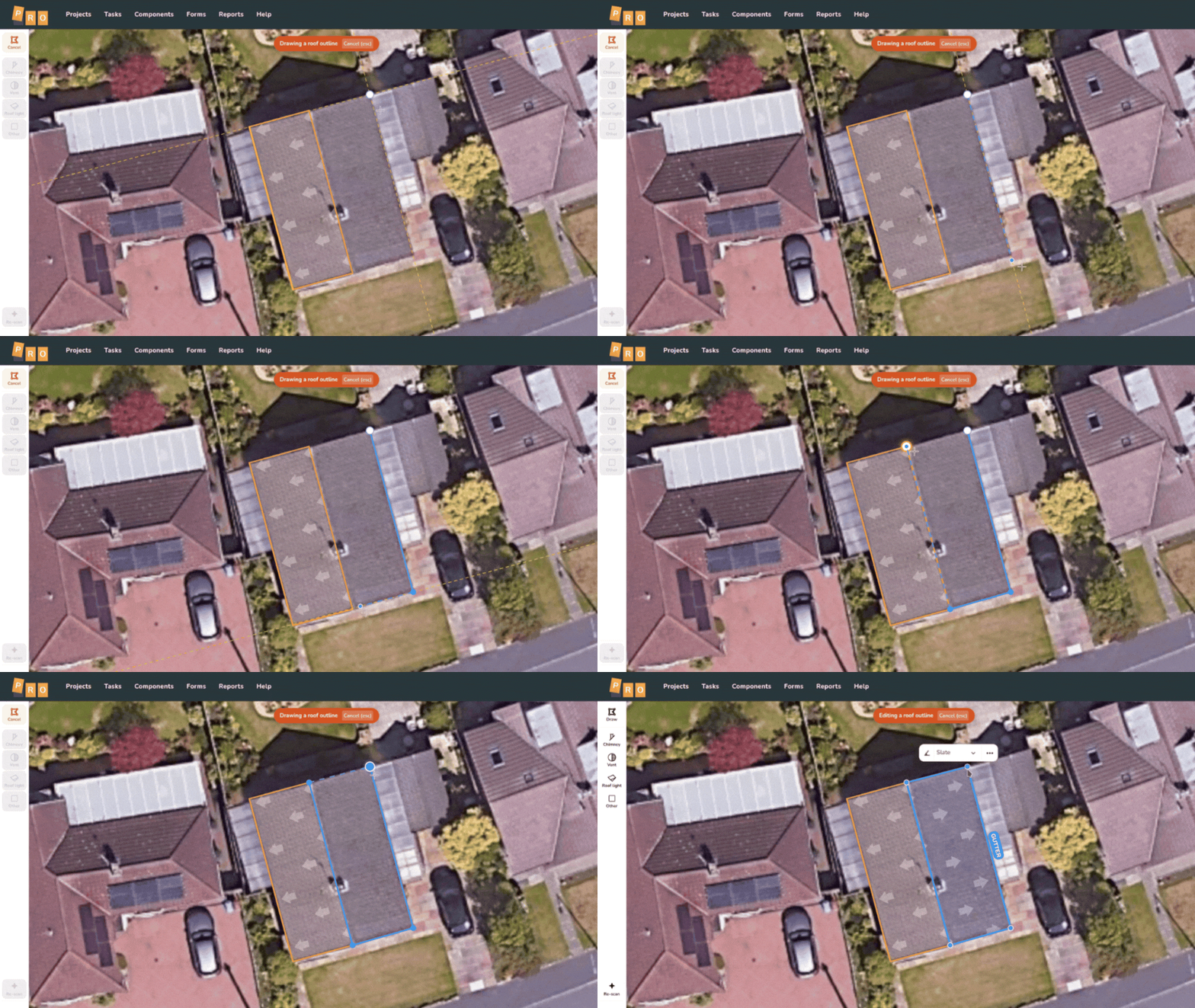
<div class="n6owBd awi2gc" data-complete="true" data-copy-service-computed-style="font-family: "Google Sans", sans-serif; font-size: 16px; font-weight: 400; margin: 12px 0px 16px; text-decoration: none; border-bottom: 0px rgb(22, 23, 26);" data-hveid="CAAIFRAA" data-processed="true" data-sfc-cp="" data-sfc-root="ep" id="bkmrk-if-you-choose-to-dra" jsaction="" jscontroller="TDBkbc#Ml18Xb" jsuid="UxKD0c_3j">If you choose to draw a roof manually, click the **Draw** option on the left. Remember that the **first edge you draw** is always assigned as the gutter. Once the shape is closed, Easy PV automatically scans the roof to determine the pitch, covering, and gutter edge. </div><div class="n6owBd awi2gc" data-complete="true" data-copy-service-computed-style="font-family: "Google Sans", sans-serif; font-size: 16px; font-weight: 400; margin: 12px 0px 16px; text-decoration: none; border-bottom: 0px rgb(22, 23, 26);" data-hveid="CAAIFRAA" data-processed="true" data-sfc-cp="" data-sfc-root="ep" id="bkmrk--17" jsaction="" jscontroller="TDBkbc#Ml18Xb" jsuid="UxKD0c_3j">  
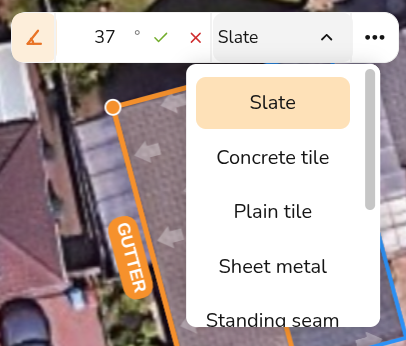
</div><div class="n6owBd awi2gc" data-complete="true" data-copy-service-computed-style="font-family: "Google Sans", sans-serif; font-size: 16px; font-weight: 400; margin: 12px 0px 16px; text-decoration: none; border-bottom: 0px rgb(22, 23, 26);" data-hveid="CAAIFhAA" data-processed="true" data-sfc-cp="" data-sfc-root="ep" id="bkmrk--18" jsaction="" jscontroller="TDBkbc#Ml18Xb" jsuid="UxKD0c_3q"></div><div class="n6owBd awi2gc" data-complete="true" data-copy-service-computed-style="font-family: "Google Sans", sans-serif; font-size: 16px; font-weight: 400; margin: 12px 0px 16px; text-decoration: none; border-bottom: 0px rgb(22, 23, 26);" data-hveid="CAAIFhAA" data-processed="true" data-sfc-cp="" data-sfc-root="ep" id="bkmrk-%5Binsert-gif-of-drawi" jsaction="" jscontroller="TDBkbc#Ml18Xb" jsuid="UxKD0c_3q"></div><div class="n6owBd awi2gc" data-complete="true" data-copy-service-computed-style="font-family: "Google Sans", sans-serif; font-size: 16px; font-weight: 400; margin: 12px 0px 16px; text-decoration: none; border-bottom: 0px rgb(22, 23, 26);" data-hveid="CAAIFhAA" data-processed="true" data-sfc-cp="" data-sfc-root="ep" id="bkmrk--19" jsaction="" jscontroller="TDBkbc#Ml18Xb" jsuid="UxKD0c_3q"></div><div class="n6owBd awi2gc" data-complete="true" data-copy-service-computed-style="font-family: "Google Sans", sans-serif; font-size: 16px; font-weight: 400; margin: 12px 0px 16px; text-decoration: none; border-bottom: 0px rgb(22, 23, 26);" data-hveid="CAAIFhAA" data-processed="true" data-sfc-cp="" data-sfc-root="ep" id="bkmrk-these-details-can-be" jsaction="" jscontroller="TDBkbc#Ml18Xb" jsuid="UxKD0c_3q">These details can be adjusted by clicking on the selected roof on the map to bring up the **mini menu**:</div><div class="n6owBd awi2gc" data-complete="true" data-copy-service-computed-style="font-family: "Google Sans", sans-serif; font-size: 16px; font-weight: 400; margin: 12px 0px 16px; text-decoration: none; border-bottom: 0px rgb(22, 23, 26);" data-hveid="CAAIFhAA" data-processed="true" data-sfc-cp="" data-sfc-root="ep" id="bkmrk--20" jsaction="" jscontroller="TDBkbc#Ml18Xb" jsuid="UxKD0c_3q"></div>[![image.png](https://help.easy-pv.co.uk/uploads/images/gallery/2026-09/scaled-1680-/pJiym33xANgVpRQw-image.png)](https://help.easy-pv.co.uk/uploads/images/gallery/2026-09/pJiym33xANgVpRQw-image.png)

<div class="n6owBd awi2gc" data-complete="true" data-copy-service-computed-style="font-family: "Google Sans", sans-serif; font-size: 16px; font-weight: 400; margin: 12px 0px 16px; text-decoration: none; border-bottom: 0px rgb(22, 23, 26);" data-hveid="CAAIFhAA" data-processed="true" data-sfc-cp="" data-sfc-root="ep" id="bkmrk--22" jsaction="" jscontroller="TDBkbc#Ml18Xb" jsuid="UxKD0c_3q"></div>- <span class="iNqyIf" data-complete="true" data-copy-service-computed-style="font-family: "Google Sans", sans-serif; font-size: 16px; font-weight: 400; margin: 0px; text-decoration: none; border-bottom: 0px rgb(22, 23, 26);" data-sfc-cp="" data-sfc-root="ep">**Pitch:** <span class="rQesXe MPyX">Set the angle of the roof slope.</span></span>
- <span class="iNqyIf" data-complete="true" data-copy-service-computed-style="font-family: "Google Sans", sans-serif; font-size: 16px; font-weight: 400; margin: 0px; text-decoration: none; border-bottom: 0px rgb(22, 23, 26);" data-sfc-cp="" data-sfc-root="ep">**Covering**: Select the material of the roof to determine mounting options.</span>

<div class="yhAwj" data-complete="true" data-copy-service-computed-style="font-family: "Google Sans", sans-serif; font-size: 14px; font-weight: 400; margin: 0px; text-decoration: none; border-bottom: 0px rgb(22, 23, 26);" data-processed="true" data-sfc-cp="" data-sfc-inited="2" data-sfc-root="ep" id="bkmrk--23" jsaction="rcuQ6b:&UxKD0c_4c|npT2md" jscontroller="UTzWVc#U8DOt" jsuid="UxKD0c_4c"></div>#### Adjusting roof shape

<div class="n6owBd awi2gc" data-complete="true" data-copy-service-computed-style="font-family: "Google Sans", sans-serif; font-size: 16px; font-weight: 400; margin: 12px 0px 16px; text-decoration: none; border-bottom: 0px rgb(22, 23, 26);" data-hveid="CAAIGRAA" data-processed="true" data-sfc-cp="" data-sfc-root="ep" id="bkmrk-when-editing-a-roof%2C" jsaction="" jscontroller="TDBkbc#Ml18Xb" jsuid="UxKD0c_4e">When editing a roof, **c<span class="iNqyIf" data-complete="true" data-copy-service-computed-style="font-family: "Google Sans", sans-serif; font-size: 16px; font-weight: 400; margin: 0px; text-decoration: none; border-bottom: 0px rgb(22, 23, 26);" data-sfc-cp="" data-sfc-root="ep">lick and drag </span>**<span class="iNqyIf" data-complete="true" data-copy-service-computed-style="font-family: "Google Sans", sans-serif; font-size: 16px; font-weight: 400; margin: 0px; text-decoration: none; border-bottom: 0px rgb(22, 23, 26);" data-sfc-cp="" data-sfc-root="ep">any of the the roof corners to adjust their position. You can also </span><span class="iNqyIf" data-complete="true" data-copy-service-computed-style="font-family: "Google Sans", sans-serif; font-size: 16px; font-weight: 400; margin: 0px; text-decoration: none; border-bottom: 0px rgb(22, 23, 26);" data-sfc-cp="" data-sfc-root="ep">**Click and drag** the main body of a roof to move it. </span></div><span class="iNqyIf" data-complete="true" data-copy-service-computed-style="font-family: "Google Sans", sans-serif; font-size: 16px; font-weight: 400; margin: 0px; text-decoration: none; border-bottom: 0px rgb(22, 23, 26);" data-sfc-cp="" data-sfc-root="ep">[![image.png](https://help.easy-pv.co.uk/uploads/images/gallery/2026-09/scaled-1680-/ld4wN6mwJTKSxnce-image.png)](https://help.easy-pv.co.uk/uploads/images/gallery/2026-09/ld4wN6mwJTKSxnce-image.png)</span>

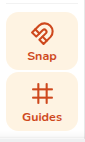
- <span class="iNqyIf" data-complete="true" data-copy-service-computed-style="font-family: "Google Sans", sans-serif; font-size: 16px; font-weight: 400; margin: 0px; text-decoration: none; border-bottom: 0px rgb(22, 23, 26);" data-sfc-cp="" data-sfc-root="ep">**Snap -** With snapping enabled, it will snap flush against neighbouring walls and corner-to-corner.</span>
- <span class="iNqyIf" data-complete="true" data-copy-service-computed-style="font-family: "Google Sans", sans-serif; font-size: 16px; font-weight: 400; margin: 0px; text-decoration: none; border-bottom: 0px rgb(22, 23, 26);" data-sfc-cp="" data-sfc-root="ep">**Guides -** Guidelines dynamically appear parallel or perpendicular to the edges <span class="rQesXe MPyX">already drawn on the map.</span></span>

<div class="yhAwj" data-complete="true" data-copy-service-computed-style="font-family: "Google Sans", sans-serif; font-size: 14px; font-weight: 400; margin: 0px; text-decoration: none; border-bottom: 0px rgb(22, 23, 26);" data-processed="true" data-sfc-cp="" data-sfc-inited="2" data-sfc-root="ep" id="bkmrk--25" jsaction="rcuQ6b:&UxKD0c_5a|npT2md" jscontroller="UTzWVc#U8DOt" jsuid="UxKD0c_5a"></div>#### Adding obstructions

[![image.png](https://help.easy-pv.co.uk/uploads/images/gallery/2026-09/scaled-1680-/Gu7gjVVDZoQxJtoa-image.png)](https://help.easy-pv.co.uk/uploads/images/gallery/2026-09/Gu7gjVVDZoQxJtoa-image.png)

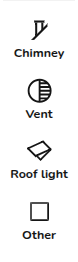
<div class="n6owBd awi2gc" data-complete="true" data-copy-service-computed-style="font-family: "Google Sans", sans-serif; font-size: 16px; font-weight: 400; margin: 12px 0px 16px; text-decoration: none; border-bottom: 0px rgb(22, 23, 26);" data-hveid="CAAIHBAA" data-processed="true" data-sfc-cp="" data-sfc-root="ep" id="bkmrk-once-you-have-your-o" jsaction="" jscontroller="TDBkbc#Ml18Xb" jsuid="UxKD0c_5c">Once you have your overall roof shape, you can add obstructions to help plan your panel placement. **Drag and drop** or **click and drag out** any of the four obstruction types from the side rail onto the roof.</div><div class="n6owBd awi2gc" data-complete="true" data-copy-service-computed-style="font-family: "Google Sans", sans-serif; font-size: 16px; font-weight: 400; margin: 12px 0px 16px; text-decoration: none; border-bottom: 0px rgb(22, 23, 26);" data-hveid="CAAIHBAA" data-processed="true" data-sfc-cp="" data-sfc-root="ep" id="bkmrk--27" jsaction="" jscontroller="TDBkbc#Ml18Xb" jsuid="UxKD0c_5c"></div>- <span class="iNqyIf" data-complete="true" data-copy-service-computed-style="font-family: "Google Sans", sans-serif; font-size: 16px; font-weight: 400; margin: 0px; text-decoration: none; border-bottom: 0px rgb(22, 23, 26);" data-sfc-cp="" data-sfc-root="ep">**Alignment snapping**: Moving an obstruction displays guide lines that snap to the edges and centres of other obstructions. Vents will snap cleanly using their exact circle centres.</span>
- <span class="iNqyIf" data-complete="true" data-copy-service-computed-style="font-family: "Google Sans", sans-serif; font-size: 16px; font-weight: 400; margin: 0px; text-decoration: none; border-bottom: 0px rgb(22, 23, 26);" data-sfc-cp="" data-sfc-root="ep">**Resizing**: Use the generous grab areas on the resize handles to change dimensions. Selected obstructions feature a status chip and a delete pill, or you can press `Delete` on your keyboard.</span>

<div class="yhAwj" data-complete="true" data-copy-service-computed-style="font-family: "Google Sans", sans-serif; font-size: 14px; font-weight: 400; margin: 0px; text-decoration: none; border-bottom: 0px rgb(22, 23, 26);" data-processed="true" data-sfc-cp="" data-sfc-inited="2" data-sfc-root="ep" id="bkmrk--28" jsaction="rcuQ6b:&UxKD0c_61|npT2md" jscontroller="UTzWVc#U8DOt" jsuid="UxKD0c_61"></div>#### Progressing to Panels

<div class="n6owBd awi2gc" data-complete="true" data-copy-service-computed-style="font-family: "Google Sans", sans-serif; font-size: 16px; font-weight: 400; margin: 12px 0px 16px; text-decoration: none; border-bottom: 0px rgb(22, 23, 26);" data-hveid="CAAIHxAA" data-processed="true" data-sfc-cp="" data-sfc-root="ep" id="bkmrk-when-your-roof-layou" jsaction="" jscontroller="TDBkbc#Ml18Xb" jsuid="UxKD0c_63">When your roof layout is complete, you have two ways to transition to your panel layout:</div>[![image.png](https://help.easy-pv.co.uk/uploads/images/gallery/2026-09/scaled-1680-/x0xzQ5msDXR9KSN2-image.png)](https://help.easy-pv.co.uk/uploads/images/gallery/2026-09/x0xzQ5msDXR9KSN2-image.png)

- <span class="iNqyIf" data-complete="true" data-copy-service-computed-style="font-family: "Google Sans", sans-serif; font-size: 16px; font-weight: 400; margin: 0px; text-decoration: none; border-bottom: 0px rgb(22, 23, 26);" data-sfc-cp="" data-sfc-root="ep">**Next button**: Takes you straight to Panels and automatically cleans up your drawing on the way. Corners get squared up, and accidental wall kinks are straightened out. </span>
- <span class="iNqyIf" data-complete="true" data-copy-service-computed-style="font-family: "Google Sans", sans-serif; font-size: 16px; font-weight: 400; margin: 0px; text-decoration: none; border-bottom: 0px rgb(22, 23, 26);" data-sfc-cp="" data-sfc-root="ep">**Fine-tune button**: Takes you to the Roof task and skips the automatic squaring process so you can manually adjust your roofs.</span>

<div class="yhAwj" data-complete="true" data-copy-service-computed-style="font-family: "Google Sans", sans-serif; font-size: 14px; font-weight: 400; margin: 0px; text-decoration: none; border-bottom: 0px rgb(22, 23, 26);" data-processed="true" data-sfc-cp="" data-sfc-inited="2" data-sfc-root="ep" id="bkmrk--30" jsaction="rcuQ6b:&UxKD0c_6t|npT2md" jscontroller="UTzWVc#U8DOt" jsuid="UxKD0c_6t"></div>---

## <span class="corp-icon material-symbols-rounded icon-support mceNonEditable" style="user-select: none;">​</span>Still Need Help?

- **Related FAQs:** Check out our [buildings and roofs FAQs](https://help.easy-pv.co.uk/books/faqs/chapter/buildings-and-roofs "Buildings and roofs") for answers to common questions
- **More guides**: Take a look at our other [buildings and roofs guides](https://help.easy-pv.co.uk/books/buildings-and-roofs) for more information

**Contact Support:** If you've got further questions, get in touch with our support team at **help@easy-pv.co.uk** (UK) or **help@easy-pv.ie** (IE). *If you are experiencing a bug, to help us look into your issue faster, please include the email address of your account, the name of the project and screenshots of any unexpected behaviour.*